![[HERO] Quick Tip: The 'Live Gallery' Texting Trick](https://cdn.marblism.com/TcSgyd3jZwm.webp)
Every photo booth owner has been there. You run a flawless event, the energy is high, and the line for the booth never stops. But when you check your analytics the next morning, the digital engagement doesn’t quite match the vibe of the room. You see a handful of downloads, but the full event gallery is essentially a ghost town.
The problem is the traditional “one-and-done” delivery method. Most booth owners configure their software to send a single image or GIF via text or email. The guest receives it, posts it to their story, and that is the end of their interaction with your brand. By the time they get your follow-up email with the full gallery link three days later, the excitement has faded. They’ve already moved on to the next thing.
To scale your business and maximize your marketing reach, you need to capture that excitement while it is still happening. That is where the “Live Gallery” texting trick comes in.
The Problem: The Post-Event Engagement Drop
Most guests only ever see their own photo. If they are in a group, they might see the photos of the people they were standing with. Once they walk away from the booth, the physical interaction ends. If your software only sends a direct link to a single file, you are creating a digital dead end.
When you wait until after the event to send out the full gallery link, you lose social media momentum. People want to share now. They want to see what their friends are doing now. If you aren’t facilitating that immediate curiosity, you are losing out on potential leads and brand exposure. Every guest at that event is a potential client for a wedding, a corporate holiday party, or a graduation. If they aren’t spending time in your digital environment, they aren’t seeing your branding.
The Tip: Text the Live Gallery URL, Not the Image
The “Live Gallery” trick is a simple configuration change in your photo booth software that yields massive results. Instead of setting your “Text Message” template to include the individual image attachment or a direct link to one file, you set the default link to the Live Event Gallery.
When a guest uses your ATA iPad photo booth, they enter their phone number as usual. Instead of receiving a text that says “Here is your photo!”, they receive a text that says: “Check out the live party gallery and find your photos here: [Link].”
When they click that link, they aren’t just seeing their one shot. They are landing in a scrolling, updated-in-real-time feed of every single person at that party having a blast.
Why the Live Gallery Trick Works
Guests are most excited while the party is actually happening. There is a specific psychological trigger at play here: curiosity and social proof. When a guest opens a full gallery, they don’t just look for their photo; they start scrolling to see who else has been in the booth.
They see the hilarious shots of their coworkers, the beautiful portraits of the bride and groom, or the high-energy GIFs of their friends. This keeps them on your branded page for minutes rather than seconds.
Because the gallery is “Live,” it updates as the night goes on. This encourages guests to revisit the link multiple times throughout the evening. Every time they revisit that link, they are interacting with your brand. They are much more likely to share multiple images to their social media stories, tagging your business and the event host, which creates a massive ripple effect of real-time exposure.
Turning One Guest into a Marketing Partner
When you use this trick, you aren’t just a service provider; you are providing a secondary entertainment platform. Guests become your marketing partners.
When a guest discovers a great shot of someone else in the gallery, they often show it to that person or text the link to them. This creates organic traffic to your gallery that you didn’t even have to pay for. It turns your photo booth into a viral loop within the confines of the event.
This is particularly effective for corporate events. Brand managers love seeing high engagement rates. When you can show a client that their gallery was viewed 1,500 times during a 4-hour event with only 200 guests, that is a powerful metric that justifies a higher booking fee for your next gig.

Pro Tip: Branding and Lead Capture
Sending guests to a live gallery is only half the battle. You need to make sure that once they are there, they know exactly who you are and how to hire you.
Your gallery header is the most valuable real estate in your digital workflow. Do not leave it blank or use a generic template.
- Your Logo: Ensure your professional logo is front and center.
- Call to Action (CTA): Include a clear “Book This Booth” or “Check Availability” button directly in the gallery interface.
- Social Links: Make it easy for them to follow you on Instagram or TikTok immediately.
By having a “Book This Booth” button inside the live gallery, you are capturing leads at the peak of their interest. If someone is having a great time at a wedding and realizes they need a booth for their own event next summer, the easiest way for them to find you is right there on their phone screen while they are scrolling the photos.
If you are just starting out, check out our guide on how to start a photo booth business to ensure your branding is set up correctly from day one.
Implementation on ATA Photo Booth Hardware
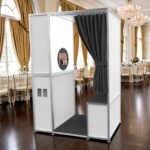
ATA Photo Booths are engineered for this kind of high-tech, seamless engagement. Whether you are using the Allure or a Lumia M Pro, the hardware is designed to handle the fast-paced nature of live uploads.
To set this up:
- Open your photo booth software settings (e.g., Snappic, Salsa, or FotoFliqs).
- Navigate to the “Sharing” or “Messaging” section.
- Locate the SMS/Text template.
- Replace the “Image Link” placeholder with the “Gallery Link” placeholder.
- Craft a catchy message like: “The party is live! See all the photos from tonight here: [Gallery_URL]”
This works best when you have a stable internet connection, as the “Live” aspect depends on the booth’s ability to upload images instantly. ATA booths are built to be robust, but always ensure your iPad or PC has a strong LTE or Wi-Fi signal to keep the gallery refreshing in real-time.
The Result: Higher ROI and Professional Authority
The difference between a “hobbyist” and a professional photo booth owner is the attention to the guest experience. Anyone can take a photo and print it. A pro creates a digital experience that lives on the guests’ phones all night.
By switching to the Live Gallery texting trick, you achieve:
- More Social Media Exposure: Guests share more photos, not just their own.
- Higher Engagement: Longer time spent on your branded digital assets.
- Instant Lead Capture: Directing hot leads to your booking page while they are impressed.
- Professionalism: You offer a high-tech experience that distinguishes you from cheaper competitors.
This simple tweak turns your ATA Photo Booth from a simple camera on a stick into a powerful marketing engine. If you haven’t tried this yet, test it out at your next event. You’ll see the difference in your analytics: and your booking inquiries: almost immediately.
Troubleshooting and FAQ
What if guests want to save just their photo?
The live gallery interface in most modern software allows guests to click on any individual photo to download it directly to their camera roll or share it to social media. They lose nothing and gain the context of the whole event.
Does this use more data?
The text message itself uses the same amount of data. The gallery browsing uses the guest’s data, but since most events have Wi-Fi or guests have unlimited plans, this is rarely an issue in 2026.
What if I have “private” photos?
Most software allows you to moderate the gallery or set certain photos to private if necessary. However, for 99% of events, the “Live” public-style gallery is exactly what people want.
For more technical tips or hardware support, visit our Knowledge Base or contact our team directly. We are here to help you grow your business with the best tech in the industry.