Printer Stand Assembly
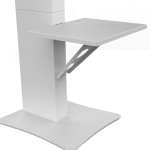
- Prepare the Base and Column
- Position the base in alignment with the grooves on the column.
- Ensure a secure fit before proceeding.
- Secure the Screws
- Insert and tighten screws to attach the column to the base.
- Check all screws for stability.
- Lock the Printer Stand
- Align the final screws with the base of the stand.
- Tighten screws to lock the stand securely.
- Final Setup
- Install the AirPrint module and power strip.
- Confirm the stand is stable and ready for use.
Setup complete! Your printer stand is ready for action. Enjoy effortless printing with AirPrint compatibility.