Most photo booth operators leave $200–$600 on the table at every booking — not because clients don’t want more, but because no one asked in the right way at the right time. Photo booth upsells are not about pressuring clients. They’re about presenting options that genuinely improve the experience, at a price point that makes the decision easy, in the moment when the client is most receptive.
This playbook gives you the specific add-ons that convert best, the pricing benchmarks your market will support, and the exact language to use — so you can start adding revenue to your next booking without reinventing anything.
In This Playbook
- The 8 Highest-Converting Add-Ons (with pricing)
- When to Present Add-Ons — Timing Is Everything
- Copy-Paste Upsell Scripts
- Packaging vs. À La Carte
- Wedding vs. Corporate Add-On Strategy
The 8 Highest-Converting Photo Booth Add-Ons
Not all add-ons are created equal. These eight consistently convert well across most markets — because they’re easy to explain, deliver visible value guests can see immediately, and justify their price without negotiation.
Custom Branded Overlay Template
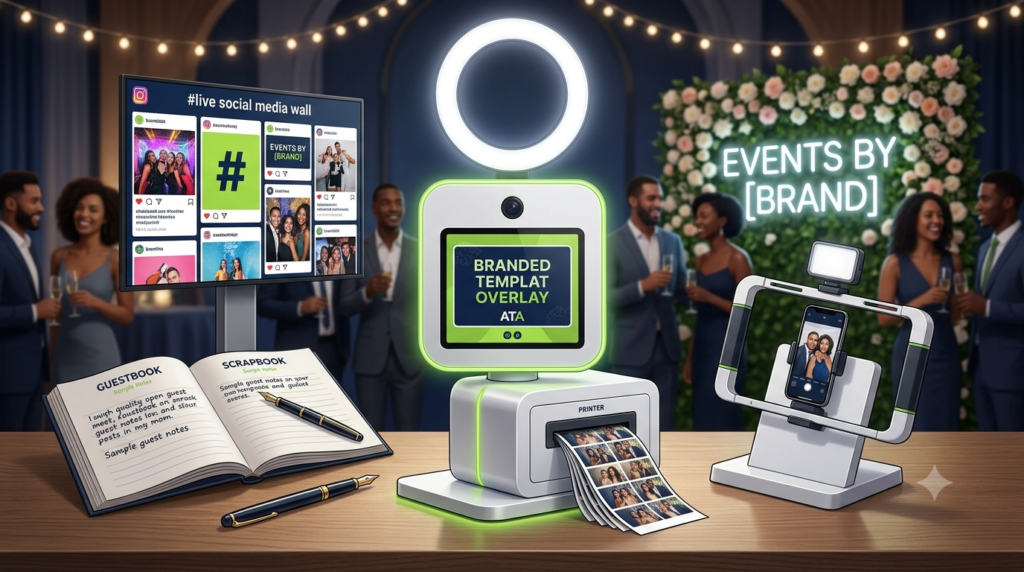
A custom template designed specifically for the event — incorporating the couple’s names, wedding date, and aesthetic (for weddings) or the brand’s logo, colors, and campaign messaging (for corporate). This is the highest-converting add-on because clients can immediately visualize the value: every photo guests share becomes a branded keepsake rather than a generic booth output.
Operator tip: Show a before/after example of a generic template vs. a custom one during the booking call. Conversion rate jumps significantly when clients can see the difference visually.
Physical Guestbook / Scrapbook
A physical printed guestbook where guests receive one copy of their photo strip and a second strip is placed into an elegant album, with guests signing and writing messages next to their photo. The guestbook becomes a tangible keepsake the couple will keep for decades — which makes this an emotionally compelling add-on that rarely requires hard selling at wedding bookings.
Operator tip: Price the guestbook to include your time for managing it during the event (typically 1–2 hours of attention). Don’t undercharge for the labor — guests take longer than expected and the attendant can’t be in two places at once.
Roaming / Handheld Booth
A second operator moves through the event with a handheld setup — typically an iPad or mirrorless camera on a portable rig with a ring light — photographing guests in their natural event environment rather than only at the stationary booth. Best positioned as a cocktail-hour add-on or a way to capture guests who never made it to the main booth. Minimal additional equipment cost makes this a high-margin add-on.
Operator tip: Position this as “everywhere coverage” — the stationary booth captures posed photos, the roaming booth captures the candid moments guests actually want to remember. Two different deliverables, not two versions of the same thing.
Data Capture & Post-Event Analytics Report
A post-event report including total activations, email/phone opt-ins collected, social share count, peak usage times, and top-performing content. Delivered as a PDF within 48 hours of the event. For corporate clients who need to justify the investment to a marketing director or VP, this report is the difference between a vendor they book once and one they bring back quarterly.
Operator tip: Most photo booth software platforms (Snappic, Darkroom) already capture this data — you’re packaging a report you could generate in 30 minutes as a $200–$400 line item. Don’t leave it on the table because you didn’t mention it.
Print Add-On (for Digital-Only Packages)
For operators running digital-only packages, adding unlimited printing for the event is a compelling upsell — especially for weddings, where physical prints remain popular as party favors. Price this to cover media costs ($0.25–$0.65/print at commercial volume) plus a margin for the printer depreciation and paper management time during the event.
Operator tip: Frame this as “instant party favors guests take home” rather than “photo prints.” The word “favors” registers immediately with wedding couples as something they were already planning to budget for.
Premium Backdrop Upgrade
An upgrade from a standard fabric or paper backdrop to a premium option — flower walls, sequin panels, custom-printed fabric, neon signs, or greenery walls that match the event aesthetic. Offer 2–3 curated options rather than unlimited choice. Most operators can add backdrops to inventory for $100–$300 each and recoup the cost within 3–5 bookings.
Operator tip: Show photos of the backdrop options during the inquiry stage — before the client has mentally “closed” on the base package. Visual decision-making converts better than a text-only add-on list at the bottom of a contract.
Extended Hours (Per Hour)
Events run long. Rather than scrambling when a client asks you to stay past your contracted time, make overtime a pre-defined, pre-priced option in your contract. Offer it proactively at booking (“If the event runs long, we offer additional hours at $X — most clients appreciate having the option”) and include it in your package comparison table so clients can self-select before signing.
Operator tip: Collect overtime rates at the time of signing, not at the end of the event. Chasing payment while breaking down equipment at 11pm is avoidable with upfront collection policies in your booking platform.
Social Media Integration & Hashtag Display
A live social wall displaying event hashtag posts in real time on a separate screen near the booth, encouraging guests to tag their photos and driving organic campaign reach. For corporate clients running branded activations, the live social wall turns the booth into a visible campaign driver — leadership walking by can see the activation working in real time, which is exactly the optics they want.
Operator tip: Price the setup fee separately from the screen rental if you don’t own the display hardware. Many venues have AV teams who can supply a screen — your add-on is the software setup and social feed curation.
When to Present Add-Ons — Timing Is Everything
The same add-on presented at the wrong moment in the booking journey converts at a fraction of the rate it would at the right moment. Here’s when each stage of the conversation is most receptive — and what to offer at each touchpoint.
Stage 1 · Initial Inquiry Response
Present Your Package Tiers — Not Individual Add-Ons
At the inquiry stage, clients don’t know what they want yet — they’re still calibrating. Lead with 2–3 clearly named package tiers (Standard, Premium, Luxury) that bundle add-ons rather than listing them individually. This anchors the conversation at a higher price point before any negotiation begins, and clients naturally gravitate toward the middle tier. Individual add-on pitches at this stage feel like a menu with too many choices.
Stage 2 · Booking Call or Proposal
Mention 1–2 Specific Add-Ons by Name
Once a client is engaged and moving toward booking, introduce one or two add-ons by name — not a full list. “Most of our wedding couples add the guestbook” works because it’s social proof without being a sales pitch. “We also offer the roaming handheld for cocktail hour if you want coverage throughout the venue” works because it solves a specific problem (what about the cocktail hour?). Lead with the benefit, not the feature.
Stage 3 · Post-Booking Confirmation (1–2 Days After)
Send a “Have You Considered?” Follow-Up
The 24–48 hours after a booking is confirmed is a high-engagement window. Clients are excited, talking about their event, and still making decisions. A short follow-up email mentioning one add-on they didn’t take — framed as a genuine thought rather than a sales push — converts surprisingly well. This is the ideal moment for the custom template add-on, since clients are often actively talking about event aesthetics in this window.
Stage 4 · 1–2 Weeks Before the Event
Final Check-In — One Last Offer
Your pre-event check-in call or email is the last opportunity to add revenue before the event happens. Keep it brief and frame it as a service check-in first (“Just confirming your setup time and any venue access notes”) and slip in one relevant add-on at the end. Extended hours works well here — the client is now thinking concretely about the event timeline and often realizes they want the buffer they didn’t think they needed two months ago.
Packaging Add-Ons vs. Selling À La Carte
The research on purchase behavior is consistent: people faced with too many individual choices tend to choose less, not more. When you present add-ons as an itemized list at the bottom of a proposal, most clients skip them. When you bundle them into named tiers, clients choose a tier — and often choose up.
A Simple Three-Tier Package Structure
Here’s a structure that works for most wedding markets. Adjust the price points for your local market and your specific add-on inventory.
| Feature | Standard | Premium (Most Popular) | Luxury |
| Price | $700 / 3 hrs | $1,050 / 4 hrs | $1,400 / 5 hrs |
| Coverage | 3 hours | 4 hours | 5 hours |
| Digital Delivery | SMS + QR | SMS + QR + AirDrop | All delivery options |
| Overlay Template | Standard overlay | Custom branded overlay | Custom branded overlay |
| Online Gallery | 30 days | 90 days | Included |
| Prints | Not included | Unlimited | Unlimited |
| Guestbook | Not included | Not included | Premium guestbook |
| Backdrop | Generic template | Not included | Premium backdrop upgrade |
Why the Middle Tier Is the Goal
Price your tiers so that the Premium package is the one that feels like the smart value. The Standard exists to make Premium look reasonable. The Luxury exists to make Premium look sensible. Most of your bookings will land in the middle — which is exactly where you want them, because you designed the middle to include the add-ons with the highest margin.
Wedding vs. Corporate Add-On Strategy
The same add-on requires completely different language depending on who’s buying. Wedding clients make emotional decisions; corporate clients justify purchases on ROI and brand value. Here’s how to frame your highest-converting add-ons for each market.
| Wedding & Private Events | Corporate & Brand Activations |
| Custom template → “A design that matches your wedding aesthetic so every photo is a keepsake, not a generic booth output” $75–$150 | Custom template → “Every shared photo carries your brand identity — logo, campaign colors, and event hashtag on every output guests post” $100–$175 |
| Guestbook → “Your guests’ handwritten messages alongside their photo — something you’ll actually keep for decades” $100–$250 | Branded delivery page → “Your brand at every digital touchpoint — the page where guests receive and share their photo, not ours” Included or $75 |
| Roaming booth → “Candid coverage during cocktail hour so you have photos from every part of your night, not just the main reception” $250–$500 | Data capture + analytics → “Opt-in email and phone collection with a post-event report covering activations, shares, and reach — your ROI documentation” $150–$400 |
| Premium backdrop → “A flower wall / sequin panel that matches your florals and photographs beautifully in every guest’s photo” $100–$200 | Social media integration → “A live hashtag wall showing guest posts in real time — visible proof the activation is working during the event itself” $150–$400 |
| Print add-on → “Instant party favors guests take home — a physical memory from your wedding night” $150–$300 | Roaming booth → “Floor-level coverage so every guest gets a branded touchpoint, not just the ones who find the stationary setup” $200–$500 |
The One-Sentence Framing Rule
For every add-on you present, complete this sentence before you say it out loud or write it in an email: “This add-on is worth it because it gives you [specific outcome the client cares about].” If you can’t complete that sentence clearly, you’re not ready to pitch the add-on. The specific outcome — not the feature description — is what converts.
The Revenue Math
At two add-ons per booking averaging $175 each, across 8 events per month, that’s $2,800 in additional monthly revenue from bookings you’ve already won — with zero additional marketing spend, no new equipment, and no new clients.