![[HERO] Quick Tip: The 'Pre-Tagging' Hack for Viral Reach](https://cdn.marblism.com/K_ANZ0A-4Jh.webp)
Every photo booth owner has experienced this: you provide an incredible experience, the photos look stunning, and the guests are thrilled. They share their digital copies to Instagram or TikTok immediately. But when you check the tags later that night, your business is nowhere to be found. The guest posted the photo, but they didn’t mention the venue, the host, or your company.
This is a missed opportunity for organic growth. In the event industry, your best marketing happens when a guest’s network sees the quality of your work. If they don’t know who provided the booth, that lead is lost. To fix this, you need to implement the “Pre-Tagging” hack. It’s a simple software adjustment that turns every single share into a targeted marketing strike.
The Problem: The High Friction of Manual Tagging
When guests are at a party, a wedding, or a corporate gala, they are there to have fun, not to do your data entry. Even the most satisfied guest is unlikely to manually type out your business handle or the event’s official hashtag. They want to upload the photo, add a quick filter, and get back to the dance floor.
Because guests skip the manual tagging, your business becomes a “silent partner” in the event. You are providing the entertainment and the content, but you aren’t getting the digital credit. This lack of attribution stops your content from traveling outside the immediate circle of the guest.
The Hack: Pre-Loading the Social Proof
The “Pre-Tagging” hack involves using your photo booth software’s default sharing settings to do the work for the guest. Before the event even begins, you need to gather two specific pieces of information from your client: their primary social media handle (Instagram or TikTok) and the event’s official hashtag.
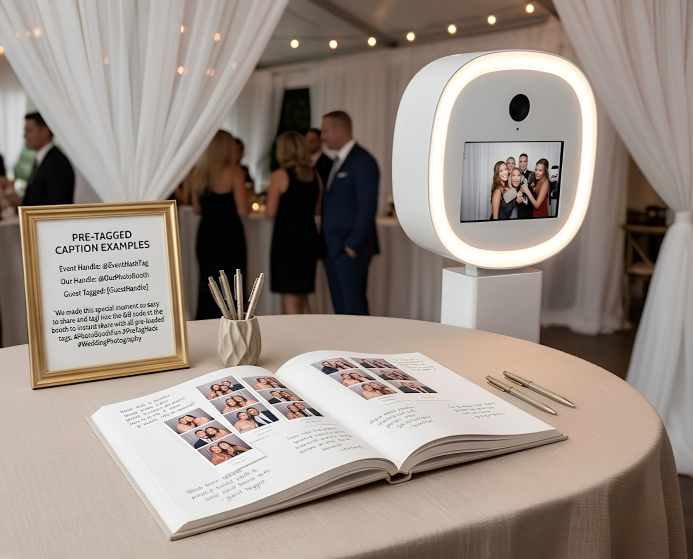
Once you have these, you go into your booth’s sharing settings. Most modern software allows you to set a “Default Caption” for emails, SMS, and direct social uploads. Instead of leaving this blank or using a generic “Made with [Software Name],” you customize it.
Your default caption should look something like this:
“Having a blast at #SmithWedding2026! 📸 Booth by @ATAPhotoBooths. Shoutout to the host @JaneSmithEvent!”
When the guest taps “Share to Instagram,” this caption is already populated in their text field. They don’t have to think; they just hit post.
Why It Works: The Reshare Notification Loop
The real magic of this hack isn’t just that the guest posts the photo. It’s what happens immediately after.
When a guest shares a photo with the host’s handle pre-tagged in the caption, the host receives an immediate notification on their phone. Because it’s their own event, the host is highly motivated to see what their guests are posting. When they see a high-quality photo from your ATA Photo Booth, their first instinct is to “Add to Story.”
Every time the host reshares a guest’s post to their own Story, your business handle is displayed to the host’s entire network. The host acts as a micro-influencer for your brand. Their friends and family see the fun, see the quality, and see exactly who to hire for their next event. This creates a viral loop that requires zero extra effort from you during the event.
Technical Implementation: Setting Up Your Software
To make this work, you need to be familiar with your booth’s backend. Whether you are using a dedicated iPad setup or a full-scale kiosk, the process is generally the same.
- Client Intake: Add a field to your pre-event questionnaire asking for social media handles and hashtags.
- Configuration: Navigate to the “Social Sharing” or “Events” tab in your software.
- Default Text: Locate the “Default Caption” or “Share Body” section.
- Formatting: Ensure you include the
@symbol for handles and the#for hashtags. - Test: Always take a test photo before the event starts and share it to your own device to ensure the tagging is formatted correctly and doesn’t get cut off.
If you are just getting started with booth operations, this is one of the most important habits to build early. It ensures that every dollar you spend on equipment is working double-time as a marketing tool.

The Result: Massive Organic Reach
By pre-tagging, you are removing the friction that prevents people from promoting you. You are making it “too easy” for them not to mention your brand. In a typical event with 100 shares, if even 30% of those result in a host reshare, you have just put your brand in front of thousands of local, relevant eyes.
This strategy is particularly effective for corporate clients. Corporate marketing teams love it when you pre-load their brand hashtags and handles. It shows that you understand their goals: which are usually focused on social media impressions and brand awareness. Using a professional setup like the Allure Photobooth combined with smart tagging makes you an indispensable partner for corporate planners.
Don’t Forget Your Own Brand
While tagging the host is the key to the reshare loop, don’t forget to include your own handle. You should always be the second or third tag in that caption.
Pro Tip: Use a “Call to Action” in the pre-loaded caption. Instead of just “@YourBusiness,” try “Booth by @YourBusiness – Book us for your next party!” It’s subtle, but it tells the viewer exactly what to do if they like what they see.
Hardware Matters for Social Sharing
While software handles the tagging, your hardware handles the quality. No one wants to share a grainy, dark, or blurry photo. The reason ATA Photo Booths are designed with integrated ring lights and high-speed processing is to ensure that the content is actually “share-worthy.”
When you provide a high-quality image, the guest wants to post it because it makes them look good. When you combine that desire with a pre-loaded caption, you have created a social media machine. If you’re looking to upgrade your setup to better handle high-volume sharing, check out our best sellers to see what’s currently leading the market.
Advanced Tactic: The “First Comment” Strategy
If your software allows for more complex workflows, or if you are managing a brand’s account directly, you can also utilize the “First Comment” strategy. As noted in social media research, putting a large block of hashtags in the first comment rather than the main caption keeps the post looking clean while still benefiting from search discoverability. For a photo booth owner, the pre-loaded caption should focus on handles (for notifications), while your own business posts can use the comment section for broader industry hashtags.
Troubleshooting Common Issues
Sometimes, the pre-tagging won’t work as expected. Here are a few things to watch for:
- Private Accounts: If a guest has a private account, the host won’t be able to reshare their post to a public story. There isn’t much you can do about this, but the host will still see the notification and the tag.
- Incorrect Handles: Double-check the spelling of the host’s handle. A typo here means the notification never reaches them.
- Platform Limitations: Some platforms, like Facebook, have stricter rules about pre-populating text via third-party apps. Always prioritize Instagram and TikTok for this hack, as they are the most “reshare-friendly” platforms.
Summary of Action Steps
To turn your next event into a viral marketing campaign, follow this checklist:
- Identify the host’s primary social handle.
- Confirm the official event hashtag.
- Enter both into your booth’s default sharing caption.
- Include your own business handle and a short CTA.
- Ensure your hardware is optimized for high-quality output.
By implementing this “Quick Tip,” you stop being a background service provider and start being a lead-generation powerhouse. You aren’t just giving people photos; you are giving them social currency, and you’re making sure you get paid in brand awareness for it.
For more professional strategies on growing your business, visit our business tips section.
Contact Information and Support
If you need help configuring your ATA hardware or software for maximum social impact, our team is available to assist.
- Website: ataphotobooths.com
- Contact Page: Contact Us
- Support: For technical questions regarding setup and integration, reach out through our dedicated support channels on the website.